
When Phishing Hunts Executives by Name
An email arrives from SharePoint. A colleague has shared a financial report, and there is a small QR code in the message asking you to scan it to open the file. Nothing about it looks unusual. The sender name matches someone you recognise, the signature carries your company's real details, and there is even a short email thread above it that seems to show the conversation so far. That last part is the tell, because none of that thread ever happened.
A phishing operation known as Venom has spent several months targeting senior executives at large organisations, using fake SharePoint sharing notices and QR codes to steal Microsoft 365 logins. What makes it worth a few minutes of your attention is that it gets past multi-factor authentication and then quietly keeps its access. This is whaling sold as a paid service, aimed at named people at the top of the org chart.
Who is actually being targeted?
Between November 2025 and March 2026, security researchers tracked a sustained credential theft campaign aimed squarely at the C-suite. According to reporting by Infosecurity Magazine and BleepingComputer, the victims were CEOs, CFOs, chairmen and VP-level staff across more than twenty industries. These were not random inboxes caught in a wide net. People were picked by name and by title, one at a time, over a five-month stretch.
That choice tells you what the attackers were after. A finance chief's mailbox holds payment approvals, supplier details and board papers. A chief executive's account can authorise things almost no one else can. Break into one of those, and you do not need to break into anything else.
Why a QR code instead of a link?
The lure carried a QR code in the body of the email rather than a clickable link. Scan it, and you are taken to the attacker's page on your phone. That shift to mobile matters. A phone is often outside the company's security tooling, the screen is small, and the full web address is harder to inspect. The code itself was rendered using Unicode characters rather than an image, which helps it slip past scanners that look for a suspicious picture.
The engineering underneath is careful. The target's email address was double Base64-encoded and tucked into the part of the web address that comes after the # symbol. Browsers never send that fragment to the server, so the victim's identity stayed invisible to security logs and reputation checks. Anyone who was not the intended target, including automated scanners and sandboxes, hit a dead end or got bounced to a real website, seeing nothing suspicious at all.
How does it get past multi-factor authentication?
Multi-factor authentication asks for a second proof on top of your password, usually a code or an approval on your phone. It is a genuinely useful control, and it stops a great many attacks. Venom is built to walk around it rather than through it.
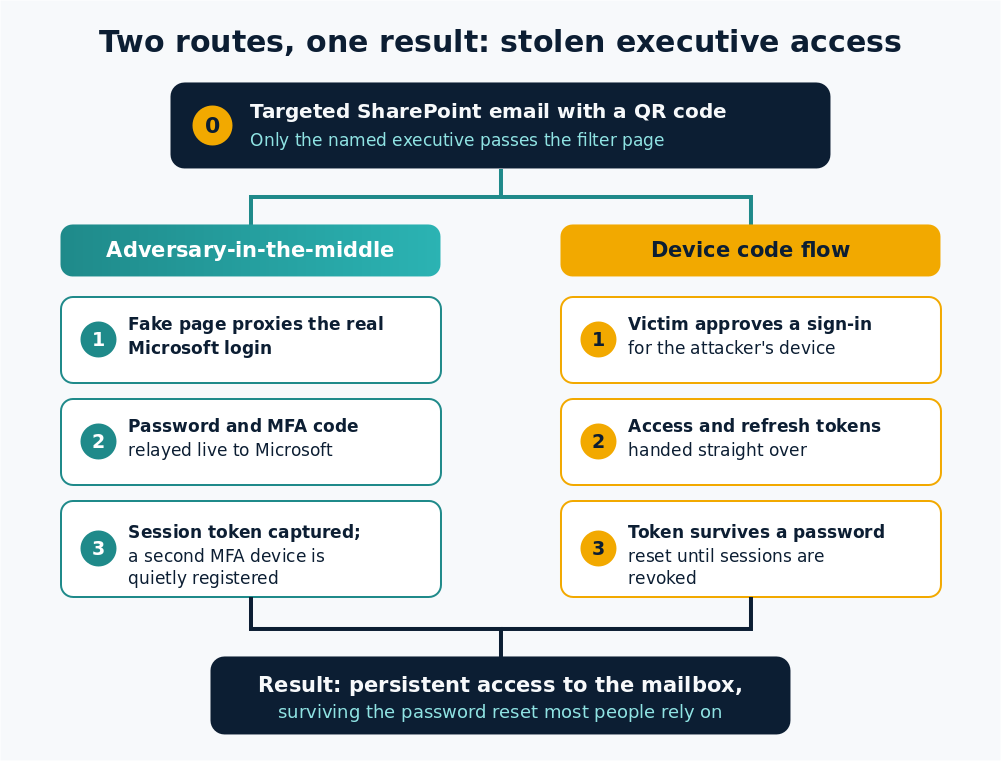
The first method is adversary-in-the-middle. The fake login page is a live proxy that sits between you and the real Microsoft sign-in. You type your password, you approve the MFA prompt, and the attacker's system passes each of those straight to Microsoft in real time. The login succeeds, and the attacker keeps the resulting session token. The second proof was real. It was just spent on someone else's session.
The second method uses Microsoft's own device code flow, a legitimate feature for signing in devices like smart TVs. The victim is tricked into approving a sign-in for a device that belongs to the attacker, who then receives valid access tokens without ever touching a login form.
The part that should worry you: it stays
Here is where the story turns. Most people assume that once they realise something is wrong, a quick password reset closes the door. With Venom, it often does not.
In the adversary-in-the-middle version, the attacker quietly registers a second authentication device on the account while the victim is still logging in. The original phone stays in place, nothing looks different, and the new device keeps working after the password changes. In the device code version, the stolen token stays valid through a password reset unless an administrator manually revokes every active session, which Microsoft's own guidance confirms is a separate step most organisations do not take by default.
Think of a forger who does not pick your pocket. Instead they copy your signature and stroll into the bank while you are still holding your wallet, sure that nothing has been taken.
The assumption worth dropping
We tend to picture the careless junior who clicks anything. Venom flips that picture. The people it hunts are senior, often well trained, and the email is engineered around their trust signals rather than their carelessness. The fake conversation thread, the real company signature, the familiar SharePoint branding are all there to pass the very checks a careful person makes. Blaming the individual misses the point. A well-run attack is built to beat good judgement, not simply to exploit the lack of it.
The researchers who documented Venom described it as a private, closed-access service with licensing, campaign management and token storage, which had not appeared on any public forum. That is the uncomfortable bit. A polished platform like this rarely stays with one operator for long, and the techniques tend to spread.
What to do about it
The advice here is calm and proportionate, and most of it is ordinary good practice.
For individuals, treat a QR code in an email the way you would treat a shortened link you cannot read. Do not scan it to reach a document. Open the file from the app itself or from a web address you already know, and if a share is unexpected, confirm it with the sender through another channel before doing anything. A thirty-second phone call has saved a lot of people.
For organisations, the strongest single move is to give senior accounts phishing-resistant sign-in such as FIDO2 security keys or passkeys, which do not hand over a code an attacker can relay. Turn off the device code flow where it is not needed, using conditional access policies. After any suspected compromise, revoke the account's sessions and refresh tokens rather than only resetting the password, and check whether any unfamiliar authentication device has been added. Above all, treat your people as a defence layer to support, not a fault to punish. Executives and help desk staff who know what a QR whaling email looks like are one of the better controls you have.
Key takeaways
- Venom is a phishing-as-a-service platform that targeted named executives with fake SharePoint notices and QR codes to steal Microsoft 365 logins.
- It defeats multi-factor authentication by relaying your login in real time or by abusing Microsoft's device code flow.
- It keeps access after the fact by registering a second authentication device or holding a token that survives a password reset.
- A password reset alone may not remove the attacker. Revoke sessions and refresh tokens, and check for new sign-in devices.
- Phishing-resistant MFA such as FIDO2 or passkeys is the most effective defence, backed by turning off unused sign-in flows.
Frequently asked questions
Does multi-factor authentication still help?
Yes. MFA blocks a large share of routine attacks and remains well worth having. Venom shows that a determined, targeted attack can get past app-based codes, which is the argument for phishing-resistant methods like FIDO2 keys or passkeys on your most sensitive accounts, not for switching MFA off.
Why are QR codes in emails risky?
A QR code hides its destination and usually sends you to your phone, which is often outside company security tools and harder to inspect. Attackers use them to move you away from the protected desktop environment and to slip past scanners that look for suspicious links.
If I reset my password, am I safe?
Not necessarily. Some of these attacks add a second authentication device or capture a token that keeps working after a password change. You also need to revoke active sessions and refresh tokens and remove any authentication method you do not recognise.
Why target executives specifically?
Senior accounts can approve payments, access sensitive documents and authorise actions that ordinary staff cannot. Compromising one high-value mailbox can be worth more to an attacker than breaking into dozens of others, which is why they are willing to spend time on individual targeting.
How can a small team defend against this?
Focus effort where it counts. Put phishing-resistant MFA on leadership and finance accounts first, turn off sign-in flows you do not use, and make sure everyone knows to verify unexpected document shares by another channel. None of this needs a large budget.
Phishing Tackle offers the tools businesses need to strengthen their human risk strategies, with multi-platform testing, real-time behavioural insights, and actionable data to keep your organisation ahead of modern cyber threats.
Contact us today to learn how Phishing Tackle can help safeguard your organisation from the growing array of cyber risks.
