
Pass-ta-key: Passkeys Are Strong, Not Untouchable
Passkeys were supposed to end the era of stolen logins. No password to guess, nothing reusable to phish, no secret sitting in a database waiting to be dumped. That promise has been taken seriously: the FIDO Alliance estimates roughly five billion passkeys are now in use, with 68% of organisations having deployed them or actively deploying them for staff sign-ins.
So new research showing how malware can hijack passkey-protected accounts deserves a careful read rather than a panicked one. In early August 2026, Palo Alto Networks Unit 42 published three attacks against Google's synced passkeys, collectively nicknamed Pass-ta-key. None of them breaks the cryptography behind passkeys. All of them start in the same place: malware already running on the victim's computer.
What passkeys actually promise
A passkey is a key pair. The private key stays with you, the website only ever sees the public key and a signature over a fresh challenge. Because the signature is tied to the site it was created for, a fake login page cannot collect anything useful. That is why passkeys are described as phishing-resistant, and the description is fair.
Google's implementation goes further than most. On a Windows desktop, private keys are generated and used inside an isolated cloud environment called the cloud authenticator, and access to those operations is gated by hardware-backed keys tied to the specific device. In Google's own words, quoted in Unit 42's report, the cloud authenticator's "primary function is to make it difficult to steal passkey private data, which would be an obvious target for malware if it were locally available."
Three assumptions hold that model together. The user gives explicit consent on the device. For multi-factor sign-ins, the user also unlocks the device with a biometric or PIN. And passkey private keys cannot be copied or shared. Unit 42's research challenges each one.
Three attacks, each worse than the last
The research focused on Google Password Manager in Chrome on Windows, on machines with a Trusted Platform Module. Every attack assumes unprivileged malware is already on the device, and none needs administrator rights.
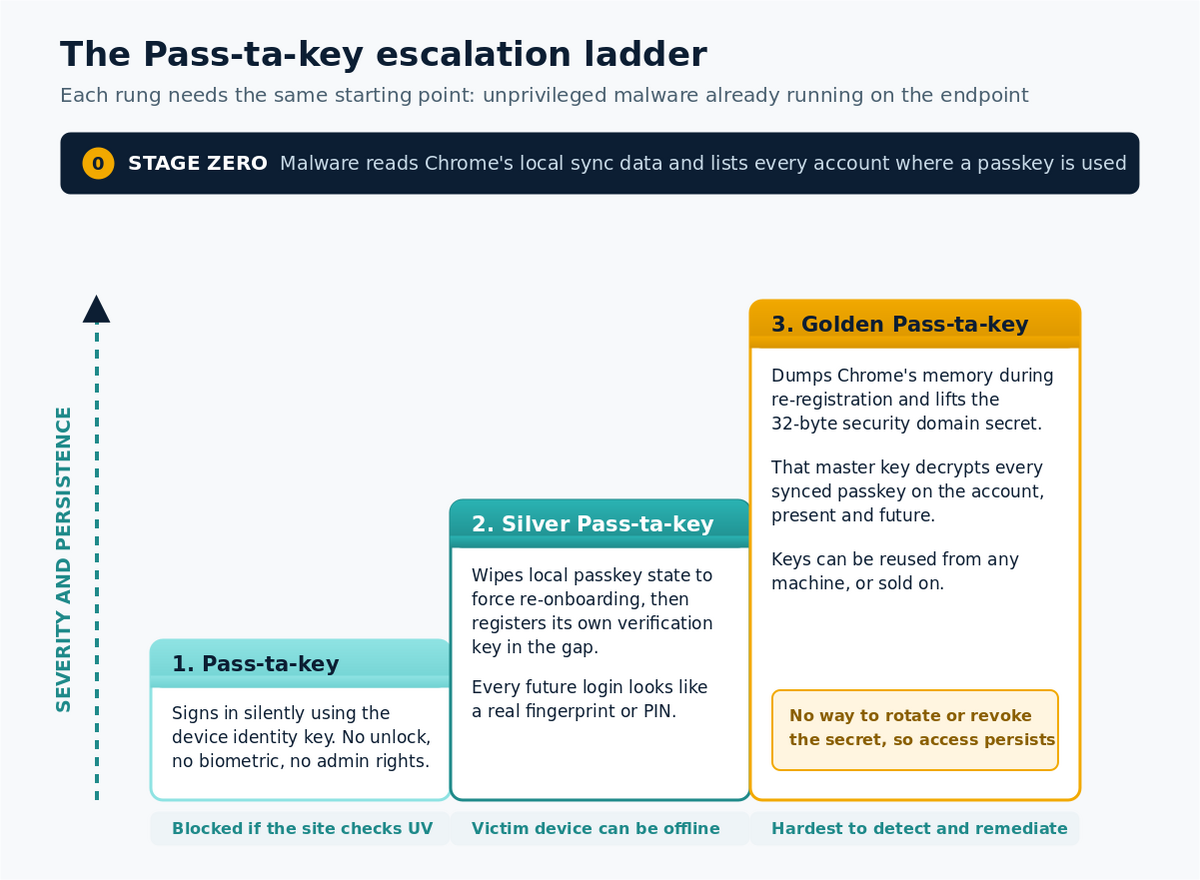
Pass-ta-key. Chrome keeps a hardware-wrapped device identity key on disk so it can prove to the cloud authenticator that a trusted machine is asking. Malware can read that wrapped key and use standard Windows cryptography calls to produce the same signature Chrome would, with no device unlock, no biometric prompt and no elevated privileges. The cloud authenticator sees a trusted device, issues a valid assertion, and the attacker signs in. In testing this failed against sites that properly require and check user verification, but succeeded against sites that ask for verification and never validate the result, reducing a supposedly multi-factor login to a single factor. eBay was one such site, and fixed the gap after Unit 42 reported it.
Silver Pass-ta-key. Rather than steal the key that proves a real fingerprint or PIN was used, the attacker deletes the local passkey state file so Chrome is forced to re-onboard the device. On Windows that re-onboarding leaves a brief window with no verification key registered. The attacker generates their own key pair and registers the public half in its place. The cloud authenticator does not check whether that key came from real hardware, so from then on anything the attacker signs looks like the victim just unlocked their laptop with a fingerprint. The victim's machine does not even need to be online.
Golden Pass-ta-key. Every synced passkey for an account is protected by one 32-byte master key, the security domain secret, which is supposed to stay inside the cloud authenticator. Unit 42 found it printed in plaintext in Chrome's own device log during registration, and after Google removed it from the logs the value was still being sent to the client and left sitting in Chrome's process memory. An attacker who forces a re-registration, dumps that memory and lifts the secret can decrypt every synced passkey on the account and use them from anywhere. Google's current design has no way to rotate or revoke that secret, so the access does not expire.
Unit 42 disclosed all of this responsibly and did not report seeing the techniques used by real attackers. Treat it as a warning about how the plumbing behaves, not as an active campaign.
Why this is a human risk story
Read the prerequisites again: malware already running as the logged-in user. That is the whole foundation, and malware rarely installs itself, so the question defenders should be asking is how it got there.
The common routes onto a corporate laptop are social: a fake browser update, a cracked installer from a search advert, a page that talks someone through pasting a command into a terminal, an attachment that looks like an invoice. Passkeys close the door on credential phishing, and attackers respond by pushing harder on the doors that remain open. The lure stops being "sign in to view this document" and becomes "run this to fix your Teams audio".
Passkeys have not made people less important to your defences. They have changed what people need to notice. The moment worth training for is no longer a suspicious login page, it is a suspicious instruction to run, install or paste something.
There is also a specific new signal staff can be taught to report. Unit 42 points out that a recovery PIN prompt belongs to onboarding or account recovery, not routine sign-ins. If someone is asked for their Google Password Manager recovery PIN out of nowhere, or gets repeated prompts during ordinary passkey use, local passkey state may have been tampered with. Nobody will spot that unless they have been told it matters and know where to report it.
What to do about it
- Keep rolling out passkeys. They still remove the most reliable attack in the credential theft playbook. Stopping now would trade a real gain for a research finding that needs endpoint compromise first.
- Treat endpoint protection as the priority it now is. Every one of these attacks starts with code running as the user, so patching, application control and endpoint detection carry more weight in a passkey world, not less.
- Check your own relying-party settings. If you build or configure services that accept passkeys, set userVerification to required and validate the user verified flag in the response. Unit 42 found real sites that asked for verification and never checked the answer.
- Prefer device-bound passkeys for the highest-risk accounts. Hardware security keys and platform passkeys that never sync sidestep the synchronisation weaknesses described here. Administrators, finance approvers and executives are the obvious candidates.
- Add unexpected recovery prompts to what people report. Recovery PIN requests and repeated re-enrolment prompts belong on the list alongside suspicious messages.
- Point training at the current lure. Fake updates, fake support instructions and copy-paste-this-command pages deserve as much attention in simulations as classic credential pages.
- Expect detection to be thin. Synced passkeys report a constant signature counter, so the usual signal for a cloned credential is missing. Session and device telemetry has to do that work instead.
The bottom line
Pass-ta-key is a useful correction to an idea that was getting comfortable. Passkeys are a genuine improvement and remain the strongest mainstream option for stopping credential phishing. What they are not is a reason to stop caring about the endpoint, or about the people using it.
The gaps Unit 42 found sit in onboarding, recovery and the trust servers place in client devices. Vendors will close them and attackers will look for the next seam. The practical lesson is that improving authentication moves the pressure somewhere else, and right now that somewhere is persuading an employee to run something they should not. People who know what that looks like, and who have an easy way to raise a hand, are worth more than any single control.
Phishing Tackle offers the tools businesses need to strengthen their human risk strategies, with multi-platform testing, real-time behavioural insights, and actionable data to keep your organisation ahead of modern cyber threats.
Contact us today to learn how Phishing Tackle can help safeguard your organisation from the growing array of cyber risks.
