
The Login Page Was Real. So Was the Permission You Granted.
You get a message on WhatsApp or Signal from someone who says they are organising an event you were invited to. There is a link to a shared document. The link opens a genuine Microsoft or Google sign-in page, you sign in as normal, approve your MFA prompt, and a box appears asking whether an app can "access your files". You click Allow because you have clicked Allow a hundred times before. Nothing looks wrong, and nothing ever will.
So what did you just hand over? Not your password. Something quieter, and in some ways more useful to the person on the other end.
In short: On 1 September 2026 the FBI's Internet Crime Complaint Center published a public service announcement describing OAuth consent phishing, where attackers trick people into approving a malicious app rather than typing a password into a fake page. Because the person signs in on the real provider page and grants the permission themselves, the attacker ends up with a token that keeps working. It does not need the password or another MFA prompt, and a password change does not remove it.
What did the FBI actually say?
The alert (I-090126-PSA) says the activity has been running since late 2025. The people contacted are described as "prominent victims, their family members, and personal acquaintances", reached by direct message on commercial messaging apps. The senders pose as government officials, media personalities or event coordinators.
The alert does not name a threat group or a specific tool, and it gives no victim numbers, so this post will not either. What it does give is a clear description of the technique, in seven steps. The attackers build malicious applications that look like ordinary services, such as file sharing or identity verification, and configure them with broad permissions, including the ability to read and write email and to reach files. They send the link. The victim signs in on the genuine cloud provider login page, sees a permission prompt and clicks Allow.
Why does the sign-in page being real matter so much?
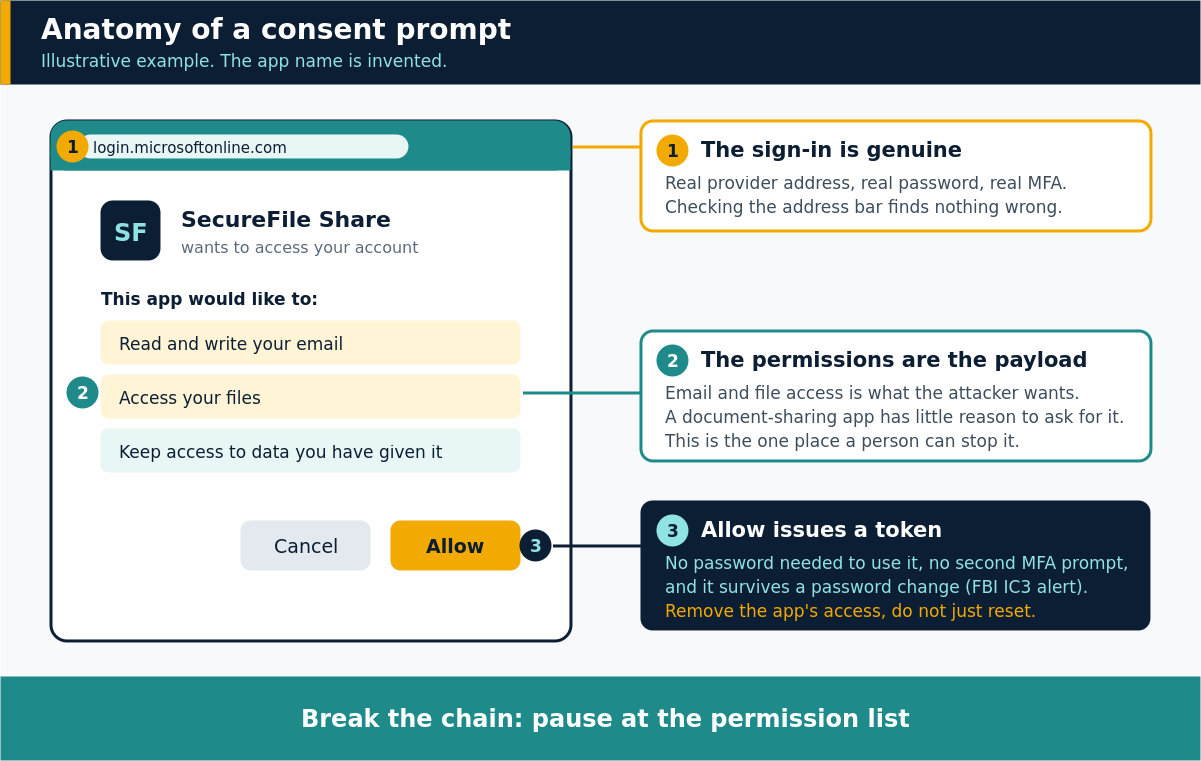
Most phishing advice is built around one idea: check the address bar. Is this really the Microsoft page? Here, it is. The URL is right, the certificate is right, and the sign-in is completed with your real password and your real MFA method.
That is the point of the technique. The deception is not in the login. It is in what happens straight afterwards, when the provider asks whether an application may act on your behalf. The prompt is also genuine, which is why it is so persuasive. The only fake thing on the whole journey is the app's name and purpose.
Think of a hotel key card. Now imagine someone persuades you to ask the front desk to cut a second card in their name, with access to every floor. The desk is real, the staff are real, and you asked for it. That second card is what consent gives an attacker.
Why does MFA not stop this?
This is the part that surprises people, and it is worth being precise. MFA does its job here. It checks that you are you when you sign in, and you are. The problem is that the sign-in is not the thing being abused.
According to the alert, once the victim clicks Allow, the actors gain persistent API access "without requiring passwords or multi-factor authentication". In plain terms, the app has been issued a token that stands in for your permission. When it reads your mailbox, it presents the token, not your credentials, so there is no second prompt to approve and nothing for you to notice. The FBI also notes that "tokens ensure persistence despite password changes". Resetting your password, the usual first response to a suspected compromise, does not by itself cut the app off.
MFA is still worth having. It defends the door, and this technique goes around it.
What can an attacker do with that access?
The alert says the actors gain "full visibility" of the configured permissions and access to file stores, including reading and sending email and reaching sensitive files. What that means in practice depends on the permissions granted, and the alert does not describe specific cases.
Is this only a risk for prominent people?
The alert describes targeting of high-profile people and those around them, including family members and personal acquaintances. That is useful context, but the technique itself does not depend on who you are. Microsoft's documentation explains that, by default, users can consent to applications for permissions that do not need administrator approval, such as access to their own mailbox. If your organisation leaves that default alone, any employee can approve an app for their own data, and personal accounts rely on the person alone.
What should individuals do?
Slow down at the permission box. It is the one moment in this attack where a person can stop it, and it is a short pause rather than a big ask.
- Read what the app wants. An app claiming to share a document has no obvious need to read and write your email.
- Check the request against the person, not the message. The FBI advises that you "independently verify the identity of the sender", for example by phoning them on a number you already have.
- Only authorise applications you trust, as the alert puts it.
- If you think you have approved something you should not have, changing your password is not enough. Remove the app's access in your account's security or connected-apps settings, and tell your IT team.
What should organisations do?
Microsoft's guidance on user consent settings in Entra is direct. It recommends allowing user consent only for applications from verified publishers, using the built-in microsoft-user-default-low policy, which limits users to permissions classified as low impact. Where a user needs something outside that, the admin consent workflow lets them request a review instead of deciding alone.
Two caveats from the same documentation are worth planning around. Changes to consent settings only affect future consent, and existing grants stay in place until someone revokes them. So tightening the policy is not the same as cleaning up. Microsoft's page on reviewing and revoking application permissions also says that user consent grants cannot be revoked through the portal, and points administrators to PowerShell or the Microsoft Graph API instead. It adds that revoking a permission does not stop a user from consenting again, so people need to know what they are looking at.
Finally, include this in awareness training and exercises. People are a defence layer to be equipped, and the most useful thing you can give them is a habit: when a permission box appears after a message they were not expecting, they pause and check.
Key takeaways
- OAuth consent phishing gets a person to approve a malicious app, so the sign-in is genuine and the fake part is the app.
- The FBI alert of 1 September 2026 says the activity has run since late 2025 and reaches targets through messaging apps.
- Per the alert, the resulting access does not need a password or MFA, and it persists after a password change.
- Individuals should read the permission list, verify the sender separately, and remove app access rather than only changing a password.
- Organisations can limit user consent to verified publishers and low-impact permissions, and should review existing grants.
Frequently asked questions
Is OAuth consent phishing the same as a fake login page?
No. A fake login page tries to capture your password. In consent phishing you sign in on the real provider page and are then asked to approve an application. The access comes from that approval.
Does changing my password remove the attacker's access?
Not on its own. The FBI alert says tokens ensure persistence despite password changes, so the app's access has to be removed in your account's security settings or by an administrator.
What should I do if I clicked Allow?
Remove the app in your account's connected-apps or security settings, tell your IT or security team, and check your mailbox and files for anything unfamiliar. Do not rely on a password reset alone.
Sources: FBI IC3 public service announcement I-090126-PSA; Microsoft Learn, Configure user consent and Manage application permissions.
Phishing Tackle offers the tools businesses need to strengthen their human risk strategies, with multi-platform testing, real-time behavioural insights, and actionable data to keep your organisation ahead of modern cyber threats.
Contact us today to learn how Phishing Tackle can help safeguard your organisation from the growing array of cyber risks.
